An IT support analyst is often described as an easy first step into technology. That description is half right. Entry can be straightforward, but staying in the same seat for years rarely leads anywhere by itself. The value of the role depends on which tasks an analyst takes on, which skills those tasks build, and whether the work produces evidence that a systems, networking, or security hiring manager can inspect.
Table of Contents
- IT Support Analyst Role and Pay at a Glance
- Job Titles That Describe the Same Work
- Core Duties and a Typical Day
- Skills for Doing the Job Well
- Certifications and Entry Routes Into the Role
- Career Outlook and Openings to 2035
- Turning Support Work Into a Systems or Security Role
- Choose Your Next Support Analyst Step
IT Support Analyst Role and Pay at a Glance
The occupation employed an estimated 689,700 people in the United States in May 2023, according to the Bureau of Labor Statistics profile for computer support specialists. That scale matters. An IT support analyst isn't a niche trainee title, but part of a large, nationally measured occupation.
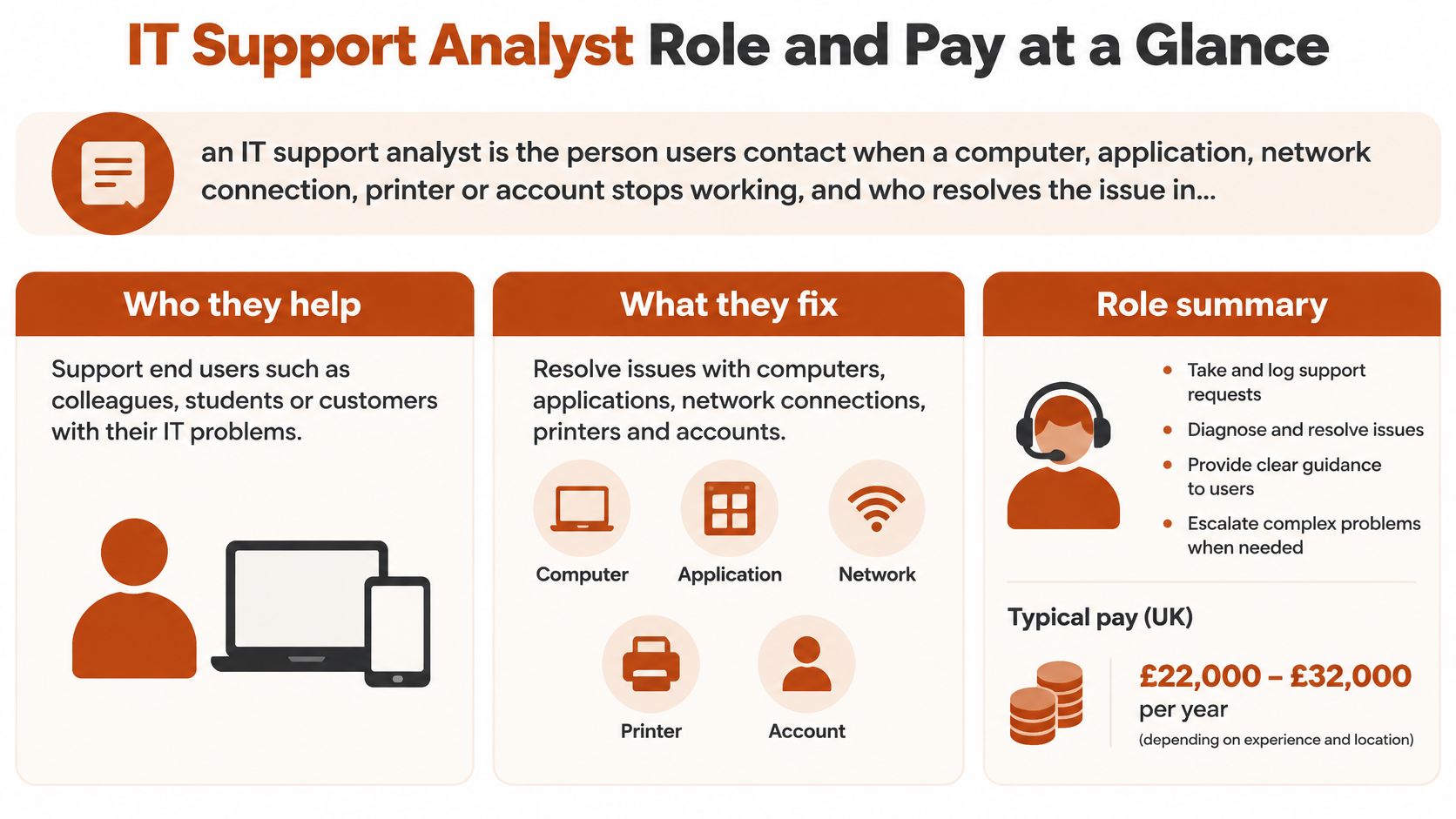
Plainly defined, an IT support analyst is the person users contact when a computer, application, network connection, printer, or account stops working, and who resolves the issue in person, by phone, chat, or email. The Bureau of Labor Statistics calls the closest matching occupation a computer user support specialist, also commonly called a help-desk technician. Work can cover hardware, software, printing, installation, word processing, electronic mail, and operating-system problems.
How to read the pay figures
The median is the middle worker, so half earned more and half earned less. The mean sits higher because a smaller group of senior earners pulls the average up. A candidate comparing an offer should place it against the percentiles, then check local postings, because seniority, scope, and location usually explain much of the spread. Broader comparisons across technology roles are available in Mojolin's guide to tech salaries by role.
Pay distribution for computer user support specialists, United States
| Measure | Value |
|---|---|
| Employment (May 2023) | 689,700 jobs |
| Lowest 10 percent | $37,690 or less |
| 25th percentile | $46,550 |
| Median | $59,240 |
| Mean | $63,640 ($30.60 per hour) |
| 75th percentile | $75,950 |
| Highest 10 percent | $97,020 or more |
Practical rule: A salary near the 25th percentile often signals a narrow, script-led queue. Pay near the 75th percentile usually comes with broader device, account, and escalation responsibility.
The job pairs two abilities that don't always sit together. Diagnosis requires knowledge of computer systems, while resolution requires a clear explanation for someone with less technical experience. An analyst who can fix a mail profile but can't explain what changed leaves the user unable to confirm the fix or avoid the same problem tomorrow.
Job Titles That Describe the Same Work
Employers use many titles for overlapping work, and the Bureau of Labor Statistics groups them under computer user support specialist. That grouping helps with pay and outlook research, but it doesn't mean every posting describes the same day. Two analysts with identical titles can face very different workloads, one answering password calls all shift and another imaging laptops, managing accounts, and owning escalations.
Common titles and how they map to the support role
| Job title | Typical scope | Overlap with the BLS role |
|---|---|---|
| IT support analyst | Tier 1 and tier 2 tickets, user setup, escalations | Core match |
| Help-desk analyst | Phone, chat and ticket queues for end users | Strong, often the same job |
| Desktop support analyst | Laptops, peripherals and software installs, often on site | Strong, more hands-on hardware |
| Computer support specialist | Official BLS occupation title | Exact match |
| Service desk analyst | Incident and request process in larger IT teams | Partial, more process-focused |
Phrases that reveal the real level
A posting's verbs are more useful than its title. Readers should scan for three signals before applying.
- Tier 1 or tier 2: Tier 1 usually means first contact, logging, and routine fixes. Tier 2 signals deeper diagnosis and fewer scripts.
- Escalation duties: Wording about receiving escalations points to harder cases. Wording about escalating everything beyond a script points to a narrower seat.
- Ownership of changes: References to adding accounts, changing permissions, building devices, or updating records show trusted access, not just call handling.
Phone and chat queues point to help-desk work. On-site hardware and device deployment point to desktop support. Incident and request process ownership, service levels, and major incident updates point to a service desk. Comparing duties row by row gives a candidate a clearer picture than sorting vacancies by title alone.
Core Duties and a Typical Day
A typical shift starts with the queue. The analyst reviews overnight tickets, checks anything marked urgent, and triages new requests by impact and urgency. A single user who can't print waits behind a team that can't sign in, even if the printer ticket arrived first.
Routine work follows. Password resets, multi-factor authentication problems, email profile fixes, software installs, and VPN failures fill much of the morning. Some issues need admin rights, a network change, or vendor support, so the analyst escalates with notes on what's already been tested. Later work often turns hands-on, with laptops imaged, phones enrolled, docks tested, and faulty peripherals swapped. Every fix gets recorded, because the next analyst needs to know what was tried.
Core duties and escalation points
| Duty | What it involves | Escalates when |
|---|---|---|
| Ticket triage | Log, categorise and prioritise requests by impact | Outage affects several users |
| User support | Resolve password, access, email and software issues | Fix needs admin rights or vendor support |
| Device setup | Image, configure and deploy laptops and phones | Hardware fault or failed deployment |
| Access management | Add, change and remove accounts and permissions | Request falls outside policy |
| Documentation | Write knowledge-base articles and incident notes | Issue repeats and needs a permanent fix |
| Incident communication | Update users on status and workarounds | Major incident is declared |
Why documentation carries weight
Documentation is the duty most often skipped under queue pressure and the one managers notice most over time. Say the same Outlook profile failure appears every Monday after updates. An analyst who fixes it resolves one ticket. An analyst who writes a clear note with the cause, the exact steps, and the check that confirms success saves the next person the same hour and creates evidence of pattern recognition.
A good ticket note answers three questions without a follow-up call. What failed, what changed, and how was success confirmed?
Postings hint at the shape of the day. A role dominated by device setup, stock, and desk visits will be physical and interrupt-driven. A role listing access reviews, knowledge articles, and incident updates will spend more time on process, records, and careful communication. Neither is automatically better, but they build different experience and suit different destinations.
Skills for Doing the Job Well
Communication isn't a soft extra in this occupation. In 2025, more than basic people skills were required for 97.0% of U.S. computer user support specialist positions, according to the U.S. Bureau of Labor Statistics Occupational Requirements Survey fact sheet. An analyst spends the day translating between systems and people, often while the person is frustrated and short of time.
Technical skills with everyday examples
- Operating systems: Installing Windows or macOS, applying updates, repairing a corrupted user profile, and checking disk or memory pressure before blaming an application.
- Network basics: Testing whether a failure sits with Wi-Fi, DNS, DHCP, or the VPN, for example by confirming a laptop has a valid address before resetting a password.
- Directory and identity tools: Creating accounts in Active Directory or a cloud directory, resetting multi-factor authentication, checking group membership, and removing access for a leaver on time.
- Remote support and ticketing tools: Taking control of a device with permission, recording each step in systems such as ServiceNow or Jira Service Management, and linking duplicate tickets during an outage.
- Simple scripting: Using a short PowerShell command to check account lockouts or gather device details instead of clicking through the same screens for every ticket.
None of these skills works in isolation. A sign-in failure might look like a password issue until directory checks show a disabled account and network tests show the device never reached the authentication service.
Communication skills that change outcomes
Strong analysts ask one diagnostic question at a time and listen for the detail the user thinks is irrelevant, such as a recent desk move or update. They explain a fix to a non-technical manager in two plain sentences, stay calm when several users report the same outage, and write notes another analyst can act on without starting again.
A useful self-check is simple. A candidate reads three current postings, marks every repeated skill, and circles the three gaps that appear most often. Those gaps, not a generic skills list, should drive the next month of practice.
Certifications and Entry Routes Into the Role
The entry bar is lower than many candidates expect. The typical entry-level education for computer user support specialists is some college but no degree, so a four-year degree isn't a precondition for a first help-desk seat. Mojolin's IT support specialist page says no prior experience is required to enter the role and that moderate-term on-the-job training is typical. Employers still expect proof that a candidate can troubleshoot calmly and methodically.
Entry and follow-on certifications by destination
| Credential | Focus | Typical fit |
|---|---|---|
| CompTIA A+ | Hardware, operating systems and troubleshooting | Standard first certification for help desk work |
| CompTIA Linux+ | Linux administration basics | Support roles moving toward servers |
| CompTIA Security+ | Security fundamentals and risk | Support roles moving toward security |
| Red Hat Certified System Administrator (RHCSA) | Hands-on Linux system administration | Analysts moving into systems administration |
| Cisco CCNA | Networking fundamentals | Analysts moving into network support |
Mojolin's IT support specialist page identifies CompTIA A+ as the standard first certification for help desk work, which makes it the sensible starting point for a newcomer without hands-on time. After several months in a queue, the second credential should follow the destination rather than fashion. Mojolin's comparison of the best IT certifications for beginners helps readers weigh that sequence before paying for an exam.
Three routes into a first seat
A career switcher might build a home lab with an old laptop, practise user accounts and operating-system installs, pass A+, and apply for tier 1 roles with lab notes as evidence. A graduate might take a support internship, learn the ticketing system and device build process, and convert that placement into an analyst title. A service desk agent already handling calls might move internally by taking escalations, documenting fixes, and asking for device or access work.
The decision test comes after entry. Servers point toward Linux+ or RHCSA, security points toward Security+, and networking points toward CCNA. Collecting unrelated certificates without matching projects produces a longer list, not a stronger application.
Career Outlook and Openings to 2035
The outlook contains two facts that sound contradictory. Employment for computer user support specialists is projected to shrink 3 percent from 2025 to 2035, yet tens of thousands of openings still appear each year on average. Most openings come from workers leaving the occupation or moving into other roles, not from new seats being created.
Projected employment change, 2025 to 2035
| Occupation | Projected change | What it means for an analyst |
|---|---|---|
| Computer user support specialists | -3% | Large entry pool, but shrinking headcount |
| Computer systems analysts | Projected to grow | A destination for analysts who learn systems design |
| Information security analysts | Projected to grow much faster | The fastest-growing of the three destinations |
| Annual openings, support specialists | Tens of thousands a year | Mostly replacement demand, not growth |
Automation, self-service password tools, and centralized support systems reduce the number of people needed for routine tickets. Replacement demand keeps doors opening, especially where experienced analysts move up or out.
Read together, the numbers describe a crowded ground floor with stairs still leading upward. Entry stays competitive because the pool is large, and the seats that empty tend to sit above the queue rather than inside it. That distinction should shape planning from the first year.
A support job therefore works best as a timed bridge. It is built to be crossed, not lived on. The shrinking headcount also changes what each ticket is worth: password resets and scripted fixes are the work automation absorbs first, so a year spent only there leaves little to show. Tickets that reach beyond the queue, into devices, access, networks or escalations, produce the record that systems and security postings ask for. An analyst who sets a target window, tracks destination postings during that window, and builds toward one destination is better placed than an analyst who expects the same role to expand.
Turning Support Work Into a Systems or Security Role
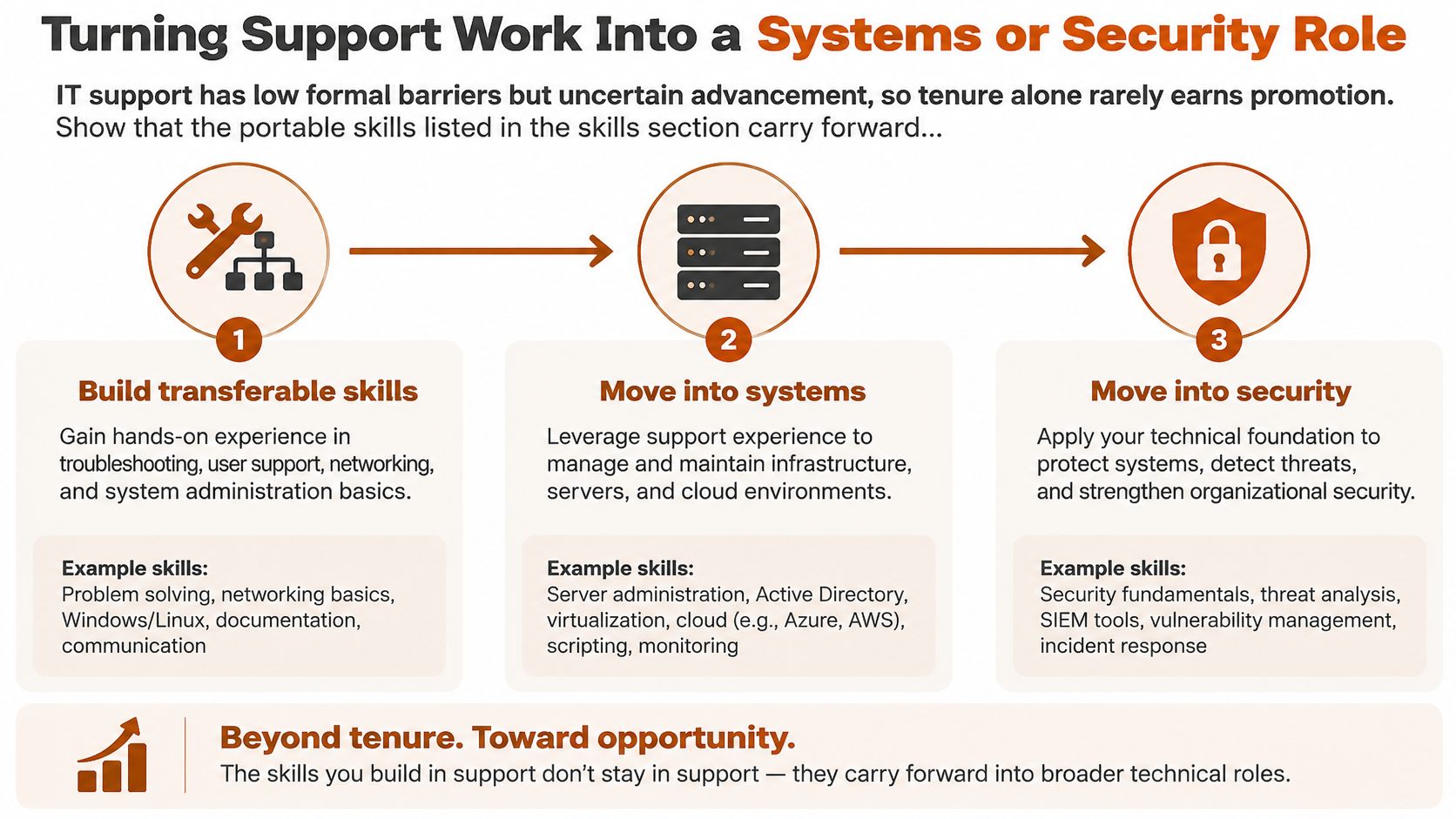
Low formal barriers create a misleading sense of security. Tenure alone rarely earns promotion, because closing more of the same tickets proves speed, not readiness for broader responsibility. The Bureau of Labor Statistics computer and information technology overview reports a median annual wage of $62,890 for the broader computer support specialist occupation in May 2025, while the outlook differs sharply by destination. Mobility depends on deliberately accumulating evidence of higher-level work.
The diagram below separates routine seat time from work that travels to another employer.
Portable skills and employer-specific knowledge
Portable skills include identity management, networking fundamentals, scripting, asset and configuration management, incident documentation, and security awareness. They remain useful in systems administration, systems analysis, cloud operations, and cybersecurity. Knowledge of one employer's ticket categories, internal form names, or a single vendor console has value in that workplace, but it rarely persuades an external hiring manager by itself.
Three examples show the difference. An analyst automates a repeated account lockout check with a short PowerShell script, tests it safely, and records the time saved across a month of tickets. The inspectable artefact is the script, with notes on inputs and safeguards. Another analyst writes a runbook for a recurring VPN failure that previously reached tier 2 every week. The artefact is the runbook, plus the fall in escalations after adoption. A third analyst leads a laptop refresh for one department or documents a phishing response from first report to password reset and user follow-up. The artefacts are the project plan or the incident report.
The short video below gives a visual walk-through of how support experience can be reframed for a broader technical role.
Progress usually arrives as a sequence of projects rather than one promotion. The pattern is clear in networking, where almost nobody is hired straight into the network architect role and the usual path runs from help desk or network support to network administrator or engineer, then senior engineer, then architect. Readers aiming at infrastructure can compare that ladder with Mojolin's profile of the systems administrator role.
Evidence test: Three dated projects with clear outcomes tell a hiring manager more than a job title held for three years.
Analysts who can't yet point to three such projects have a precise gap to close. Those who can should write each project as a problem, an action, and a measurable result, ready for an application or interview.
Choose Your Next Support Analyst Step
A clear plan beats a long list of intentions. The next step should fit one destination, one credential, and one finished piece of evidence.
- Pick one destination: Choose systems, networking, or security based on the outlook and the duties that hold attention most easily.
- Match one credential: Start with CompTIA A+ without hands-on experience, then choose the follow-on credential tied to the destination.
- Start a ticket log: Record the date, scope, action, and outcome whenever a ticket involves automation, access, documentation, or incident ownership.
- Read two destination postings: Mark repeated skills already held and the gaps that need practice or study.
- Finish one project: Complete one automation or documentation project within ninety days and save the artefact.
A review date belongs in the calendar now, with progress checked against the ticket log on that date. Mojolin publishes guides such as Entry-Level IT Jobs: Starting in Help Desk and Moving Up and Are IT certifications worth it? When they help and when not, which match the two decisions most readers face next.
Readers comparing pay, outlook, and destination roles before committing to a certification can use Mojolin's sourced career profiles to check each figure against its original report. Visit Mojolin to compare IT support with systems, networking, and security roles and choose the next step with evidence rather than guesswork.