Most career advice on how to become an IT support specialist starts with an expensive shopping list. Newcomers get told to enroll in a four-year computer science degree, pay thousands for a live bootcamp, or stack three certifications before sending a single application.
Hiring leads rarely screen entry-level applicants that way. A stack of unverified certificates doesn't show whether someone can calm down a frustrated accountant whose laptop won't boot before a payroll deadline.
The faster, lower-cost route relies on verifiable proof instead of tuition receipts. Free virtualization labs, volunteer troubleshooting, and clean ticket documentation give a hiring manager concrete evidence they can inspect in five minutes.
Table of Contents
- The Route Into IT Support, Stage by Stage
- What Employers Actually Require for Entry Roles
- How to Build Core Skills in the Right Order
- Which Certifications to Earn and When
- Getting In Without a Degree or Paid Training
- How to Apply, Interview and Set Your Pay
- Your First Two Weeks of Lab Practice
The Route Into IT Support, Stage by Stage
Breaking into a help desk or desktop support role works best as five linked stages, where every step produces an artifact an employer can verify.
- Foundations. Learn PC hardware, Windows and macOS basics, and core networking through a free curriculum or a home setup. Keep dated lab notes recording every broken configuration and the steps that fixed it.
- Structured training. Finish one hands-on program that includes timed exercises rather than passive video lectures, and write a full incident report from one of the labs to prove methodical thinking.
- First certification. Once foundational troubleshooting holds up under pressure, earn CompTIA A+ or an equivalent entry credential. Save the official certificate verification number so recruiters can validate it straight from the résumé.
- Entry experience. Pick up practical hours through nonprofit tech volunteering, a school or campus help desk, a desktop-support internship, or a first paid support desk role. Maintain a sanitized ticket log with no private user data, paired with a supervisor willing to confirm your reliability.
- Targeted applications. Apply for help desk, service desk, and desktop support openings with a small portfolio and a résumé rewritten around each posting's exact requirements.
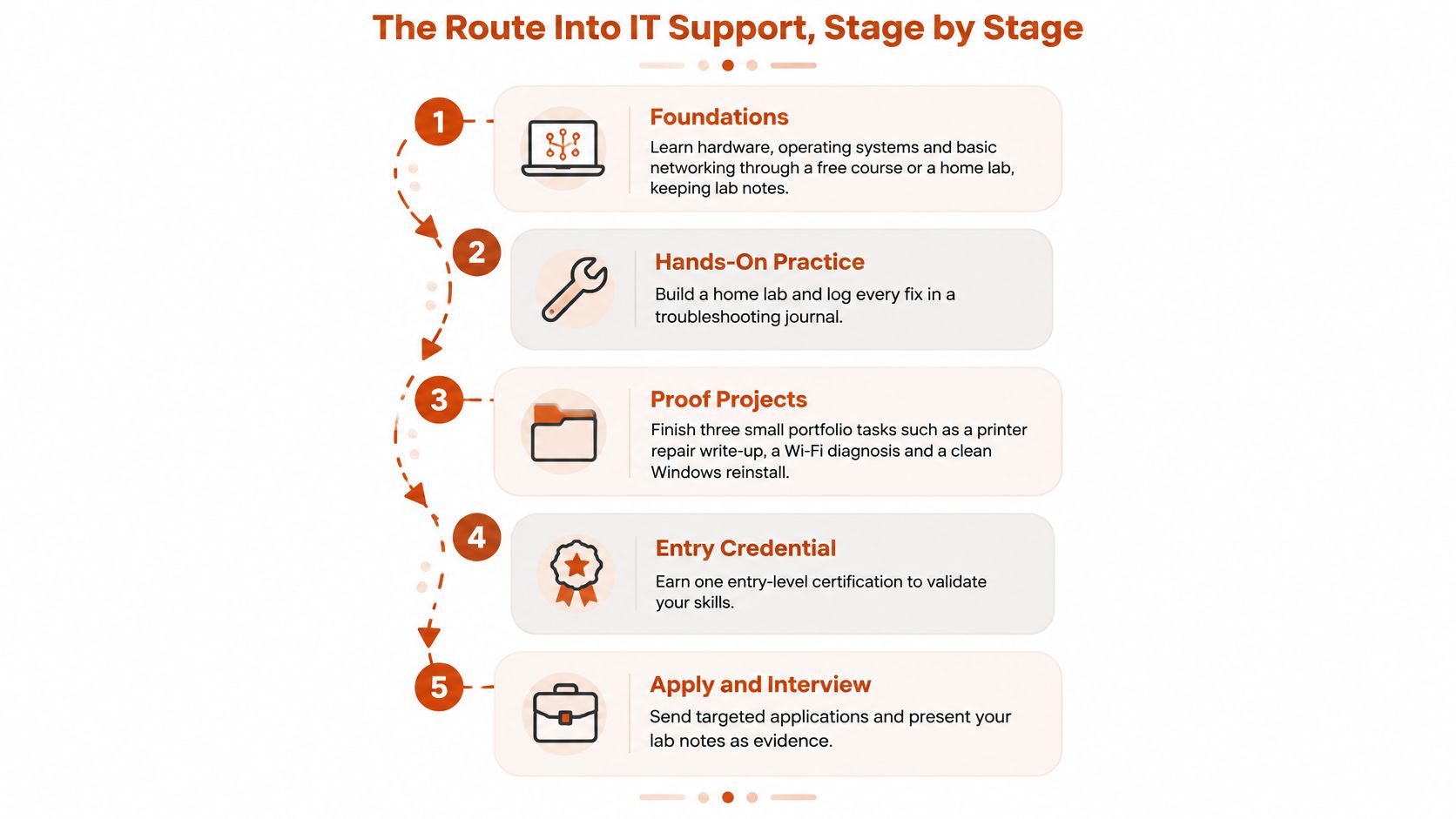
These stages don't have to happen in strict isolation. A candidate can begin sending targeted applications as soon as the third stage is complete and their lab notes read clearly enough for a stranger to follow.
Progress depends on consistent weekly practice hours, not calendar months. Someone logging twelve focused hours a week in a home lab builds stronger instincts than someone passively skimming study guides for half a year.
The real readiness test is simple: can a candidate guide a non-technical user through a fix without jargon, then write down every step clearly enough for the next technician to repeat?
What Employers Actually Require for Entry Roles
Entry-level IT job postings often read like wish lists, yet national labor data shows a much more accessible reality. According to 2025 occupational-requirement figures from the U.S. Bureau of Labor Statistics, on-the-job training was required for 86.2% of computer user-support specialist jobs, prior work experience was required for 56.8%, a high school diploma was required for 43.6%, and an associate degree was required for 32.9%.
Those shares point to an important hiring pattern. A four-year bachelor's degree isn't the standard gatekeeper for user support, while structured training after hiring is nearly universal.
Breaking Down 2025 Hiring Requirements
| Requirement | Share of jobs (2025) |
|---|---|
| Prior work experience | 56.8% |
| On-the-job training | 86.2% |
| High school diploma | 43.6% |
| Associate degree | 32.9% |
The same federal guidance notes that user-support roles typically expect some college-level computer coursework, though applicants can qualify with a high school diploma paired with relevant IT certifications. Network-support roles lean toward an associate degree more often, and large enterprises or technically complex support desks sometimes prefer a bachelor's degree.
O*NET places computer user support specialists in Job Zone Three, which indicates medium preparation built through vocational training, related workplace experience, or an associate degree. Mojolin's IT support specialist page reflects the same baseline, noting that moderate-term on-the-job training is typical and no prior experience is required to enter the role.
Because those benchmarks measure the U.S. labor market, candidates outside the United States should check local credential norms before paying for exams. Across regions, though, reading three to five live postings for entry-level IT jobs reveals what local teams actually prioritize.
Treat the experience line on an entry posting as an employer preference rather than a hard wall, and weigh the training and hands-on skill lines above the degree line. Alongside any credential, hiring managers evaluate practical grasp of operating systems, hardware, networking, account administration, cybersecurity fundamentals, ticket documentation, and clear communication with everyday users.
How to Build Core Skills in the Right Order
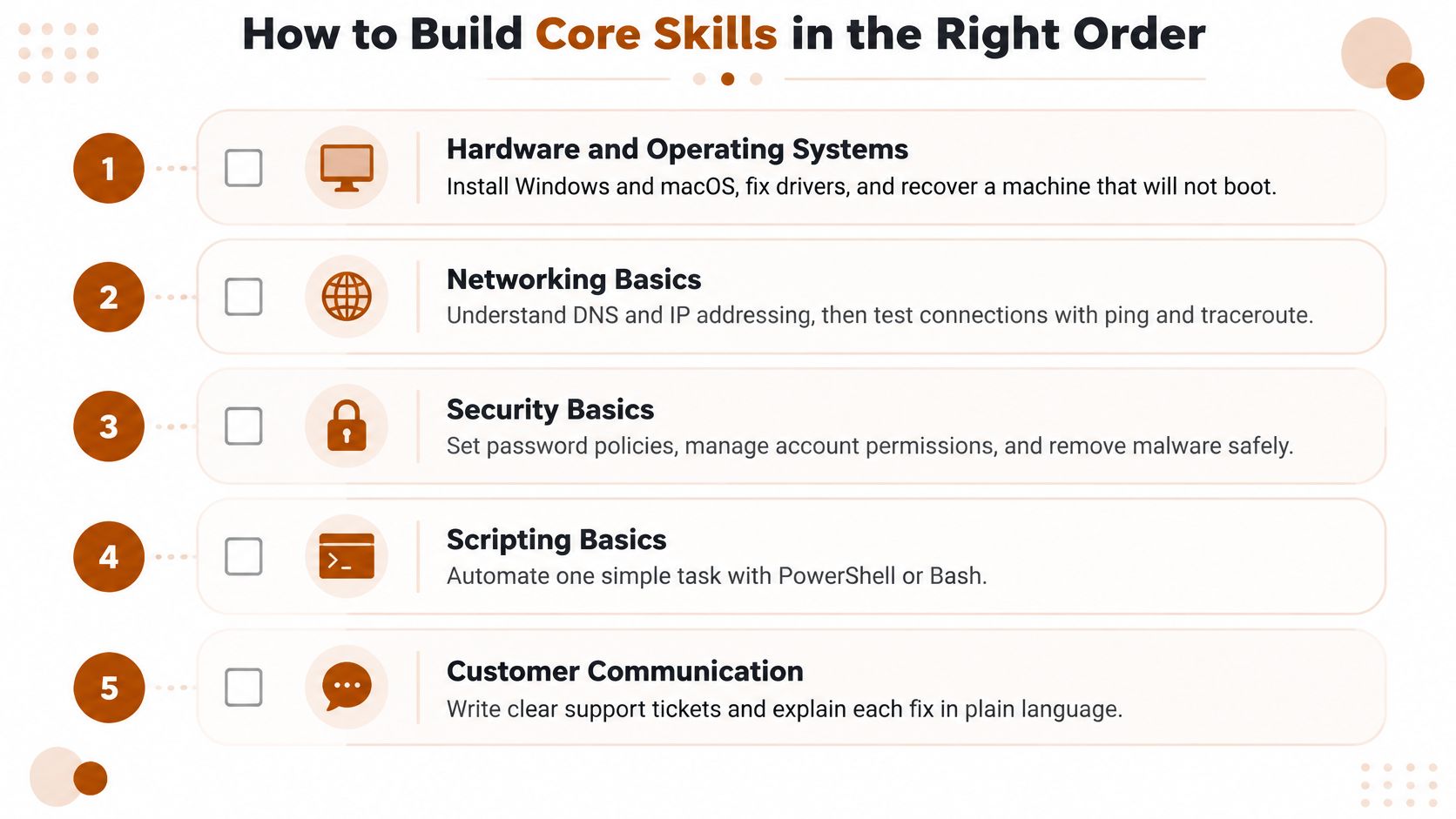
Random tutorials create gaps that show up immediately during a live technical screen. Studying skills in the order problems stack up on a real service desk makes each new topic easier to diagnose.
The Seven-Step Skill Sequence
- Hardware and operating systems. Start by installing Windows and macOS cleanly, resolving broken device drivers, and recovering a system that refuses to boot. Practice swapping storage drives or configuring fresh user profiles so device behavior stops feeling like a black box.
- Networking fundamentals. Learn how wireless networks, name resolution, and network addressing move traffic between machines. Set up a test scenario where a workstation can't reach a shared folder, then trace where the connection breaks.
- Command line and Linux. Move comfortably through directories, adjust file permissions, and inspect system logs in both a Linux terminal and Windows PowerShell. Basic command-line fluency speeds up diagnostics whenever graphical menus freeze or hide error details.
- Account administration. Practice resetting passwords, managing group memberships, enforcing least-privilege access, and configuring multi-factor authentication. A home test setup using a Windows Server evaluation makes these routine help desk tasks concrete.
- Security basics. Train to spot phishing attempts, recognize when a suspicious alert needs immediate escalation, and avoid deleting logs or files that security analysts need for investigation.
- Ticket documentation and user communication. Summarize messy user complaints into clean problem statements, record every attempted fix, and explain the resolution in plain English without talking down to the requester.
- AI-assisted troubleshooting. Use AI tools to draft initial troubleshooting checklists or condense long chat transcripts into concise ticket notes. Always verify every suggested command independently, strip sensitive user details before pasting text, and keep human approval on access changes or security calls.
Practicing Under Real Ticket Constraints
Watching video lessons feels productive, yet passive study collapses when a clock is running. A structured curriculum works best as a practice syllabus, covering practical domains like hardware, wireless networking, software installation, operating systems, system administration, security, Linux, debugging, and customer support, as mapped in the Google IT Support Professional Certificate.
That provider reports that 75% of graduates saw a positive career outcome, such as a new job, promotion, or raise, within six months. Candidates should treat that number cautiously because it's self-reported by the program and doesn't prove the certificate alone caused the job offer.
For every study module, follow a four-step drill:
- Complete the core lesson: Focus on why a system behaves a certain way rather than memorizing quiz answers.
- Rebuild it in a virtual machine: Reproduce the exact exercise using free software like VirtualBox until the fix works without looking at notes.
- Write a brief incident report: Capture the starting symptom, root cause, corrective steps, and final verification in one clean page.
- Run timed ticket queues: Mix five unrelated problems together and force yourself to triage them under a strict time limit.
Readiness check: Before calling a skill mastered, verify five habits: classify each ticket by impact and urgency, gather full reproduction steps, isolate whether the fault lives in the endpoint, network, identity, or application layer, document the fix, and confirm the user's workflow actually works before closing the ticket.
Which Certifications to Earn and When
Certifications act as a structured learning check and a résumé filter, not a magic ticket past technical interviews. CompTIA A+ remains the standard first certification for help desk work, so most beginners should start there unless every local job posting asks for a different credential.
Once an entry technician is comfortable with baseline desktop troubleshooting, the right next exam depends entirely on the tickets they want to handle next. Comparing the best IT certifications for beginners alongside live job postings keeps study budgets focused on skills employers pay for.
| Certification | Best fit | What it signals to employers |
|---|---|---|
| CompTIA A+ | Help desk and desktop support | Hardware, operating system and troubleshooting basics |
| CompTIA Linux+ | Support that uses Linux servers or command-line tickets | Working knowledge of Linux administration |
| CompTIA Security+ | Support roles that handle access, phishing or compliance | Core security concepts and risk awareness |
| Cisco CCNA | Network support tracks | Networking fundamentals for routing and switching |
| Red Hat RHCSA | Linux administration roles | Hands-on skill administering Red Hat systems |
Specialization pays off once the first support role is within reach. CompTIA Linux+ makes sense for technicians already touching Linux servers or command-line queues, while CompTIA Security+ aligns closely with desks handling access requests, phishing triage, or compliance audits.
Candidates steering toward infrastructure rather than user support have two clear tracks. Cisco CCNA fits network-support roles centered on routing and switching tickets, whereas Red Hat RHCSA signals hands-on capability for dedicated Linux system administration.
Deciding When a Credential Pays Off
Skip popularity rankings when picking an exam. Pull ten real job listings for the exact role you want and tally how often each certification appears; if a credential shows up in fewer than half of those posts, put it on hold.
Timing matters just as much as selection. Paying for an exam before building a working home lab leaves a candidate exposed during live troubleshooting questions, where memorized definitions won't solve a broken laptop scenario.
A certificate proves someone studied a syllabus and passed a test. A documented ticket log proves troubleshooting judgment under ambiguity, and competitive applicants bring both to the table.
Getting In Without a Degree or Paid Training
Many career guides imply that skipping college means buying expensive training bundles instead. That assumption leaves out talented career switchers working on tight budgets or entering tech in regions with different credential standards.
The skills gap isn't limited to senior software engineers. According to the European Commission's 2025 State of the Digital Decade report, only 55.6% of Europeans had at least basic digital skills, while ICT specialists made up just 4.8% of the workforce, well short of the EU's 2030 target of 10%. Those occupational categories explicitly include ICT operations and user-support technicians.
Still, "no degree required" doesn't mean "no evidence required." Candidates bypassing formal schooling must supply observable proof that they can troubleshoot safely, communicate clearly, and respect access controls.
Sketching out how devices, routers, and permissions connect is a straightforward way to turn home practice into documentation an interviewer can review.

Low-Cost Projects That Prove Skill
A few weeks of focused, zero-cost work can generate a portfolio stronger than a generic résumé. Build evidence in this order:
- Permissioned family or friend fixes: Troubleshoot slow laptops, printer stalls, or software glitches for people you know, then log each fix cleanly without saving personal files.
- Free virtualization lab: Spin up a small Windows or Linux environment on VirtualBox to practice OS installations, updates, and recovery tasks safely.
- Account-permission drills: Create standard and administrative accounts, restrict folder access, and verify that low-privilege users can't alter system settings.
- Home network diagram: Map out the devices, router, and wireless access points on your own home setup, noting one real outage and how it was resolved.
- Ticket simulations: Write five sample problems in standard service-desk format, showing triage priority, diagnostic steps, and closure notes.
- Plain-language user guides: Draft two short walkthroughs explaining a common task, such as setting up multi-factor authentication, for someone with zero tech background.
Everyday work experience can also bridge the gap. Customer-service counters, retail electronics departments, and community library help desks all prove patience, de-escalation, and clear communication under pressure.
Privacy boundary: Never inspect, back up, or alter another person's device or files without explicit written permission, and strip names, emails, and serial numbers before sharing any write-up publicly.
How Hiring Practices Differ Across Employers
Different organizations screen self-taught candidates in different ways, so tailor the proof to the employer:
- Internal IT teams: Managers focus heavily on reference checks, clear communication with non-technical coworkers, and accurate ticket notes.
- Managed service providers: MSPs often test raw triage speed using sample ticket queues because technicians support multiple client environments at once.
- Schools, healthcare, and public sector: These employers frequently weight formal certifications, background clearances, and strict access-control habits more heavily than private startups do.
Apply a strict cost rule before pulling out a credit card. Pay for a certification only when target postings explicitly name it and free lab evidence is already complete; otherwise, build the same skills through home labs and documented tickets first.
When aiming at schools, hospitals, or government agencies, budget for one recognized certificate early. Candidates applying outside the United States should verify which local qualifications hiring managers ask for and map every portfolio project to local job titles.
Watching how practicing technicians organize free labs and translate self-study into interviews helps make this approach concrete.
Pick one project from the list above and write up the first documented fix before the week ends.
How to Apply, Interview and Set Your Pay
Sending identical résumés to fifty job boards wastes weeks. A structured campaign built around real hiring signals gets callbacks faster.
- Gather 15 to 25 live postings. Pull listings across help desk, service desk, and desktop support titles so recurring patterns stand out immediately.
- Mirror repeated skill phrasing. Copy the exact tools and terms that appear across multiple listings, such as Active Directory, Google Workspace, or ticketing systems, into your résumé wherever you've practiced them.
- Lead with proof, not schooling. Place the home lab portfolio and documented ticket summaries near the top of the page, pushing the education section below your technical skills.
- Broaden the employer mix. Apply to managed service providers, school districts, hospitals, local government offices, and internal corporate IT teams rather than chasing only big tech brands.
- Rehearse troubleshooting out loud. Practice walking an interviewer step by step through a broken Wi-Fi or locked-account scenario, stating how you'd classify urgency, isolate the failing layer, and confirm the fix. Solid technical interview preparation focuses on clear reasoning rather than memorizing trivia.
- Interview the team back. Ask every hiring manager how on-the-job training is structured, what daily ticket volume looks like, and where complex issues escalate.
Setting Pay Expectations in a Tighter Market
Entering salary talks without a baseline leaves money on the table. In 2023, U.S. computer user support specialists earned a median annual wage of $59,240, according to the U.S. Bureau of Labor Statistics, while updated career benchmarks put median pay for IT support at $61,860.
Competition in the market makes preparation essential. In 2025, the U.S. Bureau of Labor Statistics employment projections reported 750,600 computer user support specialist jobs and projected employment to shrink 3% from 2025 to 2035.
Openings still appear constantly as technicians get promoted into systems, networking, or security roles, yet shrinking overall headcount means hiring managers can afford to be selective. Clean lab documentation is what moves an entry applicant ahead of candidates listing only coursework.
When discussing compensation, anchor on the salary range printed in the posting. If an employer omits pay details, ask for the budgeted range during the initial screen so both sides stay aligned before final interviews.
Your First Two Weeks of Lab Practice
Momentum beats long planning documents. Start this fourteen-day schedule today to produce verifiable portfolio proof without spending a dollar on courses.
- Day 1: Download free virtualization software such as VirtualBox and install a fresh Windows or Linux virtual machine from scratch.
- Days 2 to 4: Deliberately break the virtual machine's network settings, diagnose why connectivity failed, restore access, and write up each fix as a formal ticket covering symptom, cause, resolution steps, and verification.
- Days 5 to 7: Create two user accounts inside the lab, restrict administrative permissions on the standard user, install a productivity app, and document each change in plain language.
- Day 8: Choose one foundational IT support module and recreate every hands-on exercise inside the virtual machine without relying on the written walkthrough.
- Days 9 to 13: Run three timed ticket simulations back to back, then turn the trickiest scenario into a crisp one-page incident report.
- Day 14: Audit the portfolio folder to verify it holds three readable, well-structured write-ups alongside a short list of five live job postings you plan to target next.
Use one simple rule at the end of the second week. If every lab fix doesn't yet have a clean, repeatable ticket attached to it, spend two more weeks sharpening documentation before submitting applications, because clear written reasoning is exactly what interviewers test.
Comparing entry career paths, exam fees, and realistic pay bands is much easier with verified numbers in one place. Mojolin publishes sourced technology pay and job-outlook data, side-by-side IT certification comparisons with exam prices and renewal rules, and practical career guides including Entry-Level IT Jobs: Starting in Help Desk and Moving Up and Are IT certifications worth it? When they help and when not. Visit Mojolin to check current benchmarks and plan each step into IT support with confidence.